Find your kind
of useful.
Eight connected parts of life. Explore 18 application areas, 258 film-linked feature explanations, and the practical actions that carry work forward.

Home & everyday life
Groceries and checkout handoffs. Calendar time. Travel, meals, rides, smart-home routines, games, and your media library.
Explore this group ↗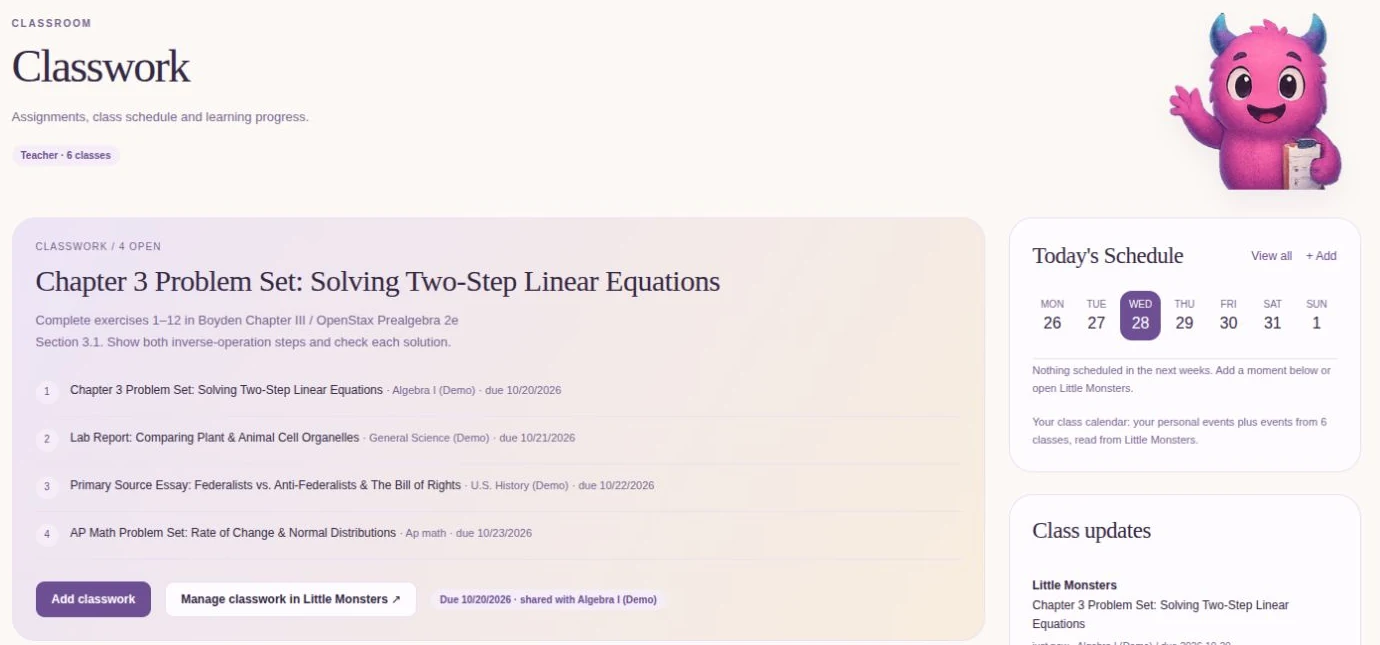
Learning & education
Create a class, record lectures, make study guides and flashcards, remember assignments, and get tutoring help.
Explore this group ↗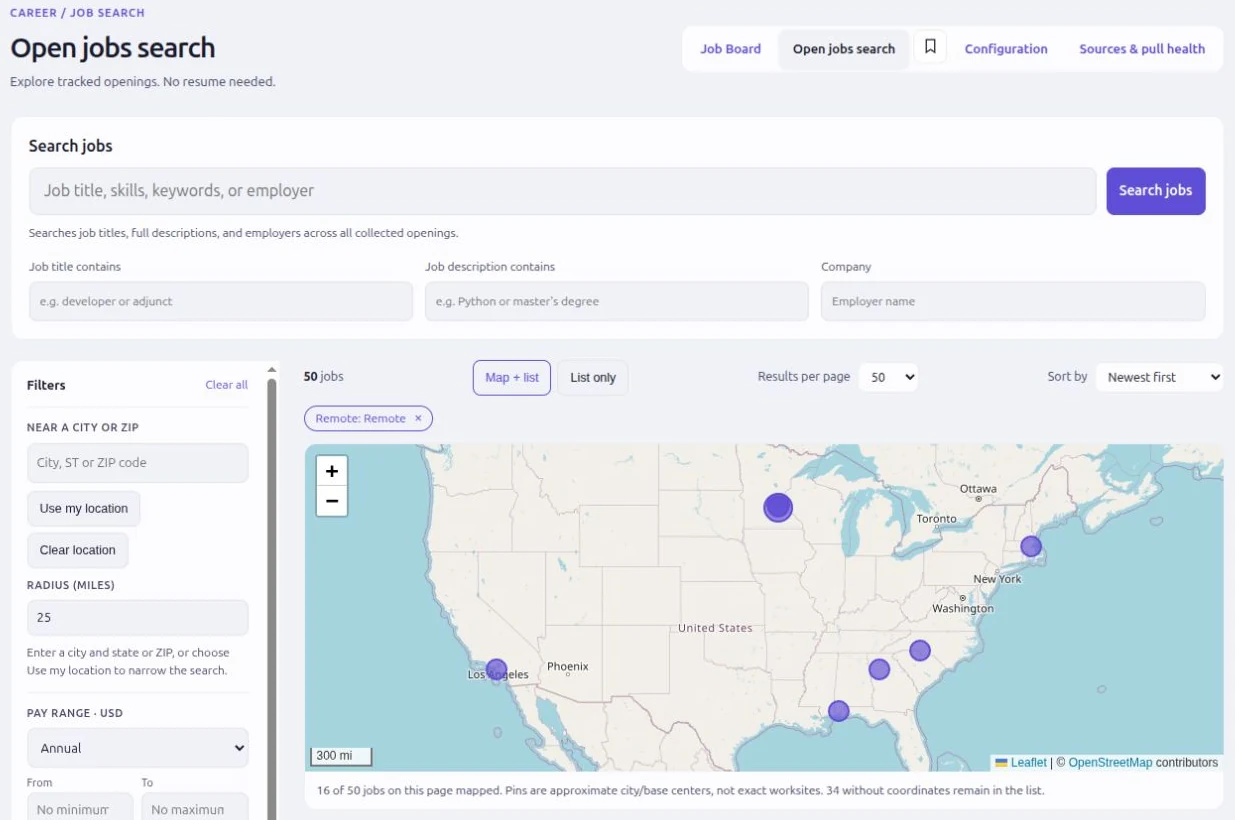
Career & opportunity
Find local and remote jobs, tailor every application, practice the interview, and close gaps in your experience.
Explore this group ↗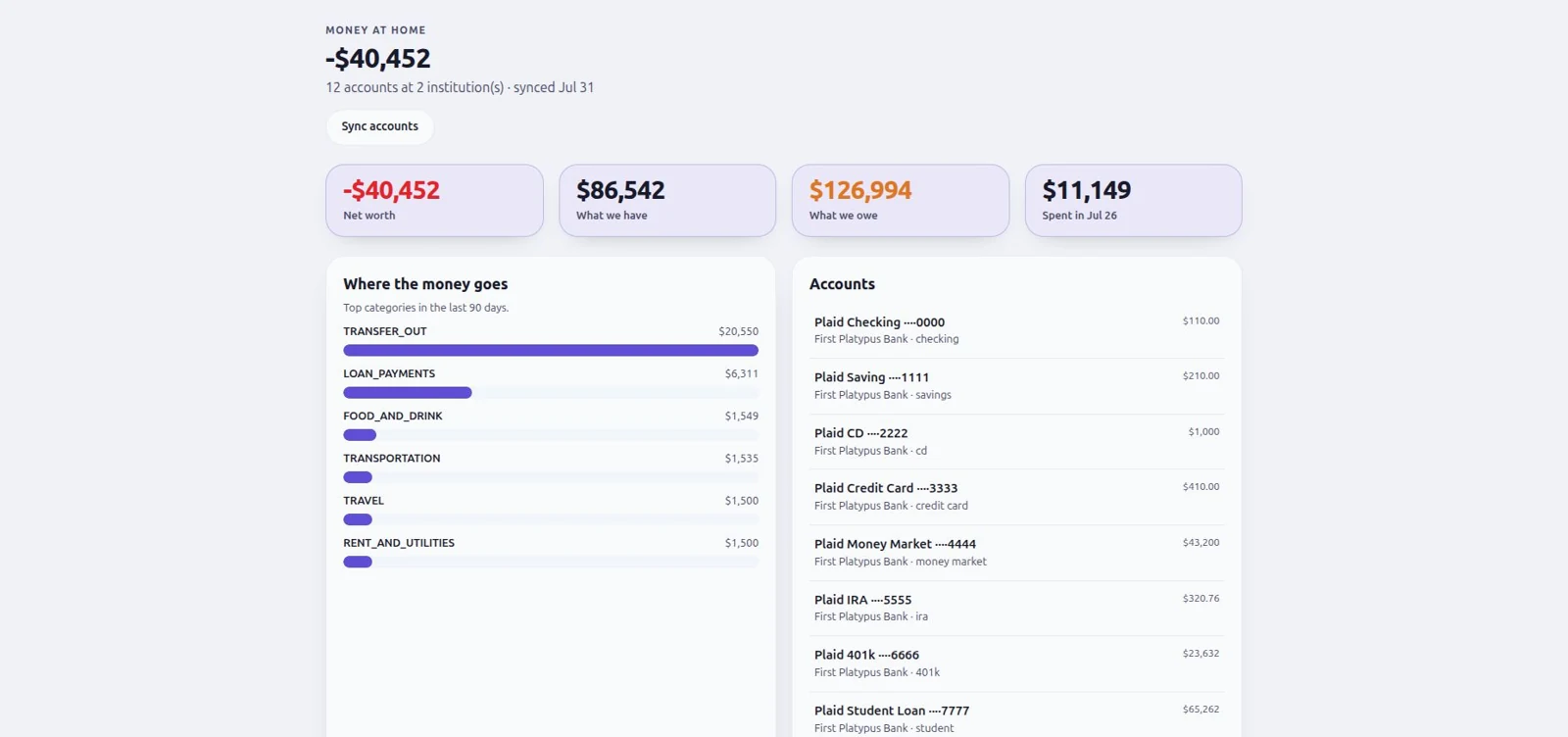
Finance & trading
Accounts, spending, holdings, and financial context—plus strategy creation, backtesting, paper trading, and reviewed deployment.
Explore this group ↗
Create, Office & making
Edit documents, images, and 3D projects yourself, or discuss changes with the embedded agent and have it apply supported edits. Refine together, then save and share.
Explore this group ↗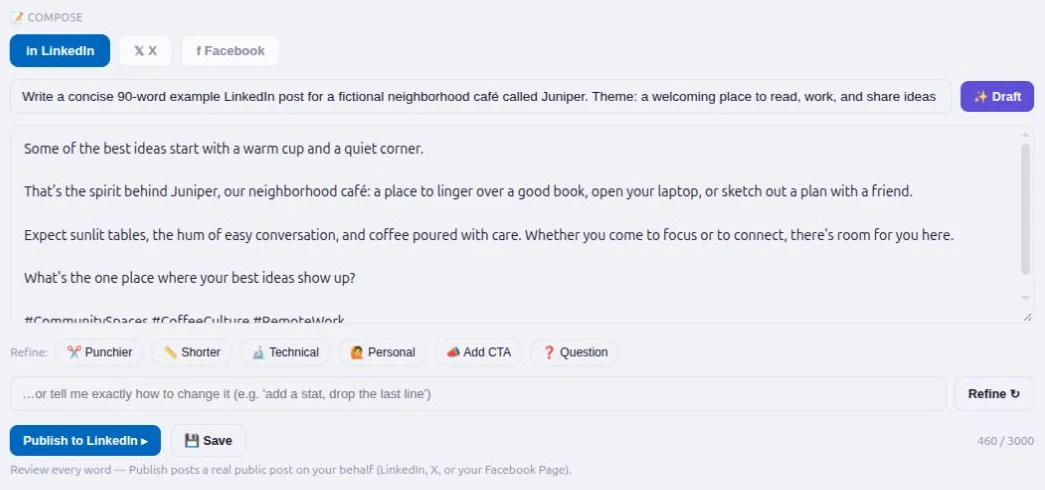
Communication & alerts
Email and social posts, assisted phone calls, and text or message alerts for the configured events that matter to you.
Explore this group ↗
Business & operations
Business planning, marketing, customers, payroll and payment records, and evidence-led operational response.
Explore this group ↗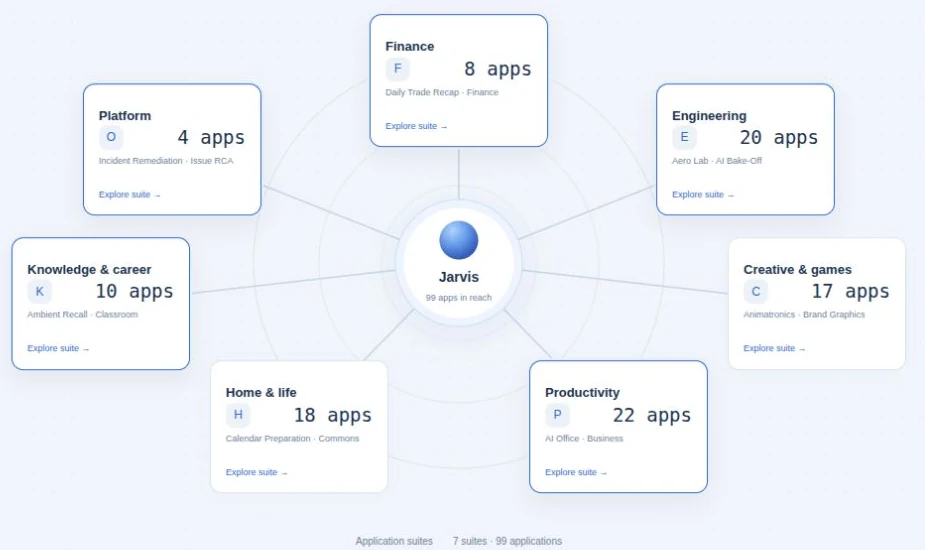
Your platform & automation
Jarvis, workflows, knowledge, connectors, models, users, security, phone access, and authorized satellite computers.
Explore this group ↗No matches yet.
Try a broader search or choose another part of your world.
Make room for the day.
Groceries and checkout handoffs. Calendar time. Travel, meals, rides, smart-home routines, games, and your media library.
Groceries & shopping
Explore this application areaKeep the household list, preferences, and purchase research in one place. Ask for help, compare the options, and review the next step.
- Shopping lists and groceriesWatch the explanation · 0:10 ↗
- Add several grocery items in one approved requestWatch the explanation · 0:10 ↗
- Maintain multiple lists and quantitiesWatch the explanation · 0:10 ↗
- Free-text items without retailer pricesWatch the explanation · 0:10 ↗
- Household preferences and budget contextWatch the explanation · 0:21 ↗
- Learned usual items and reorder suggestionsWatch the explanation · 0:21 ↗
- Retailer product searchWatch the explanation · 0:31 ↗
- Product comparisons and explain-the-pick helpWatch the explanation · 0:31 ↗
- Deals and price-aware basketsWatch the explanation · 0:31 ↗
- Reviewed checkout handoffWatch the explanation · 0:43 ↗
Home & calendar
Explore this application areaBlock time on your Open Swarm calendar, prepare for what is next, and coordinate supported devices, scenes, and schedules. Bring everyday plans into the same workspace as your household list and apps.
- Smart-device controlWatch the explanation · 0:20 ↗
- Home workspace and scheduleWatch the explanation · 0:11 ↗
- Devices and scenes across supported hubsWatch the explanation · 0:20 ↗
- Chat-directed routinesWatch the explanation · 0:20 ↗
- Scheduled home controlsWatch the explanation · 0:20 ↗
- Household views and top items needing attentionWatch the explanation · 0:11 ↗
- Personal calendar month and day viewsWatch the explanation · 0:11 ↗
- Add calendar events through an approved Jarvis requestWatch the explanation · 0:31 ↗
- Explicit Google primary-calendar snapshot syncWatch the explanation · 0:31 ↗
- Reviewed gift, meal, travel and meeting preparationWatch the explanation · 0:46 ↗
- Opt-in cited meeting briefWatch the explanation · 0:46 ↗
Travel, food & rides
Explore this application areaBring routes, flights, food, and rides into your planning conversation. Use the right application concierge for each part of the trip.
- Flight search by route, date and cabinWatch the explanation · 0:10 ↗
- Price intelligence from observed fare historyWatch the explanation · 0:10 ↗
- Fare-drop watchesWatch the explanation · 0:10 ↗
- Travel concierge and booking handoffWatch the explanation · 0:21 ↗
- Hotel and rental-car linksWatch the explanation · 0:21 ↗
- Restaurant and dish searchWatch the explanation · 0:33 ↗
- Browse menus and build one food orderWatch the explanation · 0:33 ↗
- Cuisine and dietary preferencesWatch the explanation · 0:33 ↗
- Review an Uber Eats checkout handoffWatch the explanation · 0:33 ↗
- Map-based pickup and destinationWatch the explanation · 0:45 ↗
- Distance and labelled fare estimatesWatch the explanation · 0:45 ↗
- Compare ride typesWatch the explanation · 0:45 ↗
- Review an Uber ride handoffWatch the explanation · 0:45 ↗
Games, music & media
Explore this application areaHost a tabletop adventure or a game show, let people join on their phones, and explore movies and music. Bring your own media library into a workspace that belongs at home.
- AI Dungeon Master and shared tabletopWatch the explanation ↗
- Phone participants and host controlsWatch the explanation ↗
- Four game-show formatsWatch the explanation ↗
- Shared outcomes and written rulesWatch the explanation ↗
- Personal media libraryWatch the explanation ↗
- Streaming guideWatch the explanation ↗
- Eligible free films and booksWatch the explanation ↗
- Playback and device continuityWatch the explanation ↗
- Configured local media storageWatch the explanation ↗
- Movie recommendations, watchlists and showtimesWatch the explanation · 0:10 ↗
- Spotify search and now playingWatch the explanation · 0:22 ↗
- Taste-based recommendations and playlist creationWatch the explanation · 0:22 ↗
- Library personalization and history importWatch the explanation · 0:34 ↗
- Parent-oriented Kid Lens interest briefWatch the explanation · 0:45 ↗
Sports intelligence
Explore this application areaUnderstand the matchup, your roster, and the next decision. Explore league-aware fantasy advice, team analysis, and forecasts you can compare with outcomes.
- Fantasy lineups using league-specific rulesWatch the explanation · 0:09 ↗
- Waiver, trade and streaming adviceWatch the explanation · 0:09 ↗
- Manual leagues without ESPNWatch the explanation · 0:20 ↗
- Recorded forecasts compared with outcomesWatch the explanation · 0:30 ↗
- Team-matchup and injury analysisWatch the explanation · 0:30 ↗
Keep the lesson. Build understanding.
Create a class, record lectures, make study guides and flashcards, remember assignments, and get tutoring help.
Little Monsters
Explore this application areaCreate your own class. Record the lecture. Turn it into study guides, slide decks, and flashcards. Bring assignments into your calendar, practice through games, and talk things through with your tutor.
- Create private student classesWatch the explanation ↗
- Record lectures in owned classesWatch the explanation ↗
- Generate study guides and slide decksWatch the explanation ↗
- Make flashcardsWatch the explanation ↗
- Extract assignments and show class due datesWatch the explanation ↗
- Educational gamesWatch the explanation ↗
- Material-grounded tutoringWatch the explanation ↗
- Spoken questions and read-aloudWatch the explanation ↗
- Teacher assignments and enrollmentWatch the explanation ↗
- Ella’s origin story and lived experienceWatch the explanation ↗
- Textbook and chapter readingWatch the explanation · 0:12 ↗
- Chapter-based study materialsWatch the explanation · 0:12 ↗
- Practice quizzes with server-side scoringWatch the explanation · 0:22 ↗
- Lecture summary PDFWatch the explanation · 0:22 ↗
- TimelinesWatch the explanation · 0:22 ↗
- Formula LabWatch the explanation · 0:32 ↗
- STEM helpersWatch the explanation · 0:32 ↗
- CitationsWatch the explanation · 0:32 ↗
- Material sharing reviewWatch the explanation · 0:41 ↗
- Learning rewards and My MonstersWatch the explanation · 0:41 ↗
Make your next move count.
Find local and remote jobs, tailor every application, practice the interview, and close gaps in your experience.
Intelligent Career
Explore this application areaFind local and remote roles with AI matching. Talk through your real experience, build stronger résumé bullets, and tailor the résumé and cover letter to each position. Then prepare for the interview.
- Experience interview tied to résumé bulletsWatch the explanation ↗
- Local-radius and remote job searchWatch the explanation ↗
- AI fit assessmentWatch the explanation ↗
- Gap analysis and stronger evidenceWatch the explanation ↗
- Job-specific résumé and cover letterWatch the explanation ↗
- Authorized worker-driven submissionsWatch the explanation ↗
- Position-specific interview practiceWatch the explanation ↗
- LinkedIn improvementWatch the explanation ↗
- Application status and mailbox updatesWatch the explanation ↗
- Nightly matchingWatch the explanation ↗
- Employer-source health and company feedsWatch the explanation · 0:12 ↗
- Remembered searches and pay-range contextWatch the explanation · 0:12 ↗
- Recruiter workflowWatch the explanation · 0:22 ↗
- Private LinkedIn job leadsWatch the explanation · 0:22 ↗
- Profile photo integrationWatch the explanation · 0:33 ↗
- Printed career evidence intakeWatch the explanation · 0:33 ↗
- Setup readiness across member appsWatch the explanation · 0:45 ↗
See your money. Test your thinking.
Accounts, spending, holdings, and financial context—plus strategy creation, backtesting, paper trading, and reviewed deployment.
Finance & trading
Explore this application areaUnderstand connected accounts, net worth, holdings, and spending with a plain-English financial brief. For trading, create a strategy, backtest your assumptions, practice with paper money, and deploy through supported broker connections with your approval and limits.
- Strategy building and saved versionsWatch the explanation ↗
- Explicit costs and assumptionsWatch the explanation ↗
- Historical backtesting and benchmarksWatch the explanation ↗
- Drawdowns and execution evidenceWatch the explanation ↗
- Separate paper account and simulated fillsWatch the explanation ↗
- Approved strategy deployment with limitsWatch the explanation ↗
- Watcher-managed exitsWatch the explanation ↗
- Connected accounts, holdings and spending briefsWatch the explanation · 0:11 ↗
- Conversational Strategy StudioWatch the explanation · 0:11 ↗
- Research, watchlists and market moversWatch the explanation · 0:11 ↗
- Portfolio allocation and monthly reviewWatch the explanation · 0:22 ↗
- Earnings rules and event playbooksWatch the explanation · 0:22 ↗
- Timed orders and settlement visibilityWatch the explanation · 0:32 ↗
- Futures research proposalsWatch the explanation · 0:45 ↗
- Approved daily recap productionWatch the explanation · 0:45 ↗
- Bias-contextualized world newsWatch the explanation · 0:23 ↗
- Entity relationships and sentiment historyWatch the explanation · 0:23 ↗
- Prediction-market probability and risk viewsWatch the explanation · 0:34 ↗
Your idea. An agent beside you.
Edit documents, images, and 3D projects yourself, or discuss changes with the embedded agent and have it apply supported edits. Refine together, then save and share.
Intelligent Office
Explore this application areaWork side by side with an embedded agent on Word documents, Excel workbooks, and PowerPoint presentations. Edit the content yourself, or discuss a change and review the edits your AI partner prepares for the document. Email a copy, download it, or save to your configured local, mapped, or cloud storage.
- PowerPoint slidesWatch the explanation ↗
- Word documentsWatch the explanation ↗
- Excel workbooksWatch the explanation ↗
- Outline and AI partnerWatch the explanation ↗
- Themes and editable structureWatch the explanation ↗
- Download a copyWatch the explanation ↗
- Email a copyWatch the explanation ↗
- Save locallyWatch the explanation ↗
- Supported connected cloud or mapped storageWatch the explanation ↗
- PDF through dedicated creative toolsWatch the explanation ↗
- Open and regenerate existing filesWatch the explanation · 0:10 ↗
- Dictation and phone editing chipsWatch the explanation · 0:10 ↗
- Per-bucket code and file storage targetsWatch the explanation · 0:20 ↗
- Storage assistant for notes and filesWatch the explanation · 0:20 ↗
- Send an artifact into another applicationWatch the explanation · 0:33 ↗
Images & portraits
Explore this application areaMake your own adjustments to layers, text, masks, and colors. Describe the change you want AI to make to an image region, review the result, and accept it into the project. Keep working by hand and with AI as the image takes shape.
- Layered image editingWatch the explanation ↗
- Text and shapesWatch the explanation ↗
- FiltersWatch the explanation ↗
- Masks and adjustmentsWatch the explanation ↗
- AI region editing reviewWatch the explanation ↗
- TemplatesWatch the explanation ↗
- RevisionsWatch the explanation ↗
- PNG/JPEG/project exportWatch the explanation ↗
- Portrait toolsWatch the explanation ↗
- Vector paths and SVG boundariesWatch the explanation · 0:10 ↗
- Isolated layer groupsWatch the explanation · 0:10 ↗
- Brush masksWatch the explanation · 0:10 ↗
- PSD inspection and reviewed conversionWatch the explanation · 0:21 ↗
- Brand-kit assetsWatch the explanation · 0:32 ↗
- Camera and multi-person portraitsWatch the explanation · 0:32 ↗
- Incoming image artifact handoffsWatch the explanation · 0:43 ↗
Open Swarm Create
Explore this application areaWork side by side on documents, images, presentations, and 3D scenes. Make adjustments yourself, or discuss what you want to change and have the embedded agent apply supported edits to the work. Review the result, refine it together, and keep creating.
- Movie timeline editingWatch the explanation ↗
- Motion compositionsWatch the explanation ↗
- Publishing layoutsWatch the explanation ↗
- PDF toolsWatch the explanation ↗
- LoRA charactersWatch the explanation ↗
- Story and video generationWatch the explanation ↗
- Scene and 3D creationWatch the explanation ↗
- Scan-to-Print overviewWatch the explanation ↗
- Multitrack video, audio, captions and render jobsWatch the explanation · 0:11 ↗
- Motion keyframes and composition exchangeWatch the explanation · 0:24 ↗
- Linked publication stories, styles and mastersWatch the explanation · 0:34 ↗
- PDF page operations, forms and OCRWatch the explanation · 0:46 ↗
- Godot and Blender project editingWatch the explanation · 0:12 ↗
- Character training scorecards and overnight improvementWatch the explanation · 0:23 ↗
- 3D scan geometry and printer handoffWatch the explanation · 0:34 ↗
Engineering & making
Explore this application areaWork with CAD, circuit simulation, energy models, and physical projects. Pair a conversation with concrete editors, calculations, and simulation evidence.
- Parametric CAD and exportable geometryWatch the explanation · 0:11 ↗
- Real SPICE circuit simulation and waveformsWatch the explanation · 0:11 ↗
- Circuit mechanism to CAD handoffWatch the explanation · 0:11 ↗
- Solar aircraft design and energy budgetsWatch the explanation · 0:23 ↗
- Marine and thermal energy designWatch the explanation · 0:35 ↗
- Relay-network sizing and failure simulationWatch the explanation · 0:35 ↗
- Walkthrough and LiDAR space capturesWatch the explanation · 0:11 ↗
- Explorable 3D scenes and Wi-Fi mappingWatch the explanation · 0:11 ↗
- Animatronic poses and rehearsalsWatch the explanation · 0:22 ↗
- Talking projection propsWatch the explanation · 0:22 ↗
- Camera controlsWatch the explanation · 0:33 ↗
- Drone mission planningWatch the explanation · 0:33 ↗
- Embodied robot simulationWatch the explanation · 0:44 ↗
- Satellite orbit and command simulationWatch the explanation · 0:44 ↗
Stay connected. Know when to act.
Email and social posts, assisted phone calls, and text or message alerts for the configured events that matter to you.
Communication, calls & alerts
Explore this application areaBring email, social messages, assisted phone tasks, and configured alerts into your world. Draft a reply or post, place an approved call, and receive text or Telegram alerts for the notification topics you choose.
- Inbox summaries and reply draftsWatch the explanation · 0:10 ↗
- Prioritized My Day digestWatch the explanation · 0:10 ↗
- Connected Gmail, Microsoft and Yahoo inbox viewsWatch the explanation · 0:10 ↗
- Unified Today board and person-based threadsWatch the explanation · 0:10 ↗
- Separate workspaces for brands and identitiesWatch the explanation · 0:22 ↗
- Confirmed Gmail reply outboxWatch the explanation · 0:22 ↗
- Connected message feeds and trendsWatch the explanation · 0:50 ↗
- One draft with platform-specific variantsWatch the explanation · 0:36 ↗
- Content review and publishing calendarWatch the explanation · 0:36 ↗
- Broadcast composer with per-channel resultsWatch the explanation · 0:36 ↗
- Social signals and LinkedIn assistantWatch the explanation · 0:50 ↗
- Configurable phone tasks and call reportsWatch the explanation · 0:50 ↗
Turn plans into coordinated work.
Business planning, marketing, customers, payroll and payment records, and evidence-led operational response.
Business & marketing
Explore this application areaConnect business assumptions, costs, campaigns, and customer work. Draft launch material, compare scenarios, and organize payroll or payment records through optional business applications.
- MarketingWatch the explanation · 0:09 ↗
- Business plansWatch the explanation · 0:31 ↗
- PayrollWatch the explanation · 0:11 ↗
- PaymentsWatch the explanation · 0:33 ↗
- Customer managementWatch the explanation · 0:44 ↗
- Campaign stages and opt-in channel consentWatch the explanation · 0:09 ↗
- Launch kits and content draftingWatch the explanation · 0:09 ↗
- Tagged links and deterministic scorecardsWatch the explanation · 0:21 ↗
- Experiment registry and approved budgetsWatch the explanation · 0:21 ↗
- Business assumptions with sources and rangesWatch the explanation · 0:31 ↗
- BOM, costs, margins, cash and funding documentsWatch the explanation · 0:31 ↗
- Capability and integration discoveryWatch the explanation · 0:44 ↗
- Payroll earnings and deductionsWatch the explanation · 0:11 ↗
- Payroll artifacts and reconciliationWatch the explanation · 0:11 ↗
- Customer payment pagesWatch the explanation · 0:33 ↗
- Payment history and refundsWatch the explanation · 0:33 ↗
Sales & capture
Explore this application areaOrganize contacts, activities, and opportunities. For teams with the appropriate packages, extend the process into federal qualification, capture, proposals, and contract delivery.
- Leads, contacts, accounts and opportunitiesWatch the explanation · 0:12 ↗
- Activities, targets, dashboards and importsWatch the explanation · 0:12 ↗
- Sales roles and delegationWatch the explanation · 0:24 ↗
- Connected mailbox record summariesWatch the explanation · 0:24 ↗
- Prospect intake and approved campaignsWatch the explanation · 0:35 ↗
- Federal qualification and capture pipelineWatch the explanation · 0:45 ↗
- Proposal and contract delivery recordsWatch the explanation · 0:45 ↗
Intelligent Operations
Explore this application areaConnect operational signals, investigate with bounded evidence, review a response plan, and verify the result. Make the investigation and the action understandable.
- Systems and topologyWatch the explanation ↗
- Alert validation, deduplication and noise reductionWatch the explanation ↗
- Correlation and configured anomaliesWatch the explanation ↗
- Bounded evidence and runbooksWatch the explanation ↗
- Investigate, review and reviseWatch the explanation ↗
- Exact response artifacts and target approvalWatch the explanation ↗
- Verification plus resolved signalWatch the explanation ↗
- Console and Git-based provisioningWatch the explanation ↗
- Dedicated Intelligent Processing alert queueWatch the explanation · 0:11 ↗
- Provider-specific operations connectionsWatch the explanation · 0:11 ↗
- Full recorded incident-to-recovery demonstrationWatch the explanation · 0:57 ↗
Choose the tools. Connect the work.
Jarvis, workflows, knowledge, connectors, models, users, security, phone access, and authorized satellite computers.
Jarvis & knowledge
Explore this application areaBring relevant context into the next step. Jarvis can coordinate supported application tools, pass results between them, and produce artifacts you can review. Add your own knowledge, print-to-knowledge intake, and optional ambient listening.
- Multi-application request chainingWatch the explanation ↗
- Earlier results passed into later workWatch the explanation ↗
- Application concierges and agent workflowsWatch the explanation ↗
- Useful artifacts and review boundariesWatch the explanation ↗
- Optional ambient listeningWatch the explanation ↗
- Wake phrases and languageWatch the explanation ↗
- Transcript retention and reviewWatch the explanation ↗
- Optional speaker separationWatch the explanation ↗
- Summaries and reviewed follow-upsWatch the explanation ↗
- Knowledge retrievalWatch the explanation ↗
- Optional semantic matchingWatch the explanation ↗
- Source provenanceWatch the explanation ↗
- Private, shared and application collectionsWatch the explanation ↗
- Access checks and local processing choicesWatch the explanation ↗
- Virtual printer intakeWatch the explanation ↗
- Review inboxWatch the explanation ↗
- Explicit private/shared/bot destinationsWatch the explanation ↗
- Approve multiple destinationsWatch the explanation ↗
- Visible partial filing outcomesWatch the explanation ↗
- Personal preferences and persistent contextWatch the explanation · 0:11 ↗
- Briefings across your admitted appsWatch the explanation · 0:23 ↗
- Everyday chains involving shopping, calendar and travelWatch the explanation · 0:34 ↗
- Saved files reused across tasksWatch the explanation · 0:23 ↗
Core & connections
Explore this application areaSee and use real applications, with embedded AI concierges beside you. Make an easy change yourself, or discuss it and have the concierge handle available updates. Connect the work with agents, services, models, and workflows on infrastructure you choose.
- Home, business, finance and learning platformWatch the explanation ↗
- Application access and protected credentialsWatch the explanation ↗
- Supported connectors and toolsWatch the explanation ↗
- Workflow authoring and approval gatesWatch the explanation ↗
- Bot Forge draftsWatch the explanation ↗
- Compatible model and harness choiceWatch the explanation ↗
- Hosted, self-hosted and local optionsWatch the explanation ↗
- Phone access and enrolled satellite workersWatch the explanation ↗
- Identity Hub account launching and access reviewWatch the explanation · 0:35 ↗
- Cloud operations with configured credentialsWatch the explanation · 0:35 ↗
- Developer documentation indexingWatch the explanation · 0:47 ↗
- AI Bake-Off quality/cost comparisonWatch the explanation · 0:47 ↗
- Detailed local installation and provider setupWatch the explanation · 0:10 ↗
- Multi-user identity and multi-tenant workspace boundariesWatch the explanation · 0:32 ↗
- Caller, tenant and capped administrator provider fundingWatch the explanation · 0:49 ↗
- Bot configuration, model selection and task routingWatch the explanation · 1:07 ↗
- Application sharing and private credential boundariesWatch the explanation · 2:07 ↗
- Windows WSL 2 and Docker prerequisitesWatch the explanation · 0:29 ↗
- Published native GHCR kernel, PowerShell installer and real password setupWatch the explanation · 0:57 ↗
- Selected home applications, family users and optional account runtimeWatch the explanation · 1:51 ↗
- Small-laptop capacity, persistent storage and restart commandsWatch the explanation · 2:45 ↗